
How to Choose an Industrial Panel Computer in 2026?

Choosing an Industrial Panel Computer in 2026 is not just a matter of screen size or processor speed. The right unit must fit the worksite, the software, and the people who use it every day. A bright display can be essential beside a sunlit loading bay, while sealed connections matter near dust, washdown, or vibration. Small details can decide whether a system stays dependable.

This guide explains how to compare display size and readability, processor and memory needs, operating systems, touch technology, and available I/O. It also covers mounting, enclosure ratings, temperature limits, and product lifecycle support. These specifications should be checked against the actual installation, not just a sales sheet. A listed rating alone does not describe every real-world condition.

Think about the whole deployment. Will operators wear gloves? Must the computer connect to a scanner, PLC, or legacy device? How difficult will replacement be after several years? Request documentation, confirm compatibility, and test the unit in representative conditions before committing. That takes time. And some trade-offs remain: a stronger enclosure may limit service access, while extra computing power can add cost without improving the task. A careful choice balances verified requirements with practical constraints, rather than chasing the highest specification.
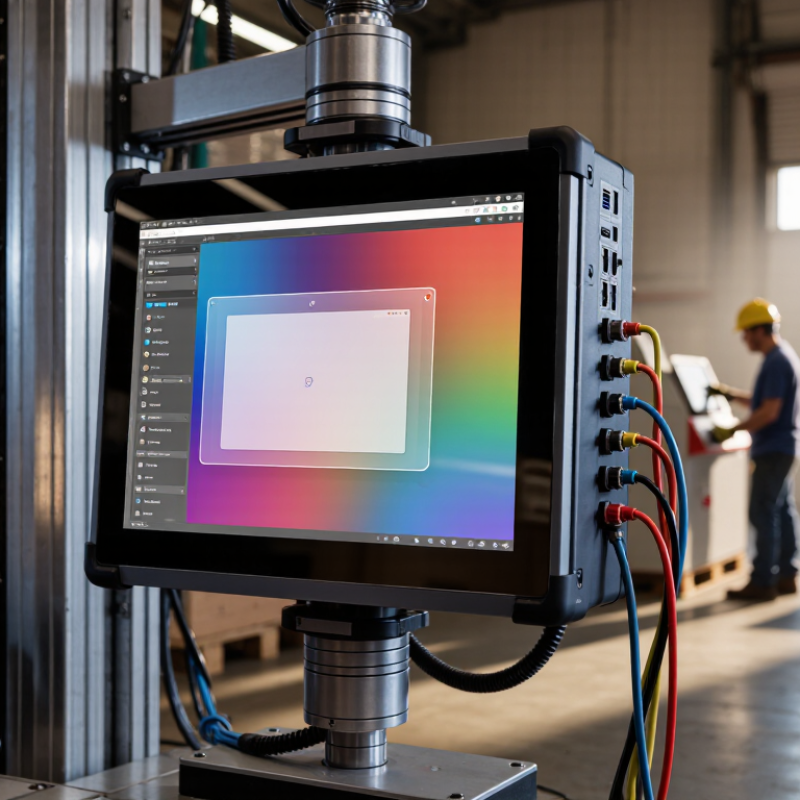
How to Choose an Industrial Panel Computer in 2026?

Define the Application and Operating Requirements

How to Choose an Industrial Panel Computer in 2026?

Define the Application and Operating Requirements

Start with the job the computer must perform. Is it displaying machine status, collecting inspection data, or running a local control interface? A workstation beside a packaging line may need a bright touchscreen that operators can use with gloves. A unit inside a sealed cabinet may need different cooling and mounting options. Write down who uses it, where it sits, and what it connects to.

Next, document actual operating conditions. Note the ambient temperature range, dust or moisture exposure, vibration, available power, and expected operating hours. List required ports, such as Ethernet, USB, or serial connections, and confirm they match existing equipment. Specify the operating system, software, boot time, and data-retention needs. Check the computer’s published specifications against these conditions, rather than relying on a general “industrial” label. Our first estimate is often wrong; a short site survey can reveal a hot enclosure or an awkward viewing angle.

Tips: Photograph the mounting area and record connector locations before choosing a screen size. Test the interface with gloves, if operators will wear them. Leave room for cables and maintenance access. A spreadsheet helps, but it can miss small daily frustrations.

Choose the Panel Computer’s Size, Mounting Style, and Display

Choose the Panel Computer’s Size, Mounting Style, and Display

Start with the operator’s task, not the largest screen that fits the budget. A 10-inch panel may suit a compact machine with a few status indicators; a larger display can make dense process diagrams easier to read. Measure the cutout, available depth, and clearance for cables before ordering. For arm or VESA mounting, verify the hole pattern, panel weight, and support capacity. VESA’s Flat Display Mounting Interface standard defines common mounting interfaces, but it does not confirm that a particular arm can handle vibration or a cantilevered load. Check the equipment’s actual installation conditions. There is no perfect size.

Display placement matters as much as diagonal measurement. OSHA’s Computer Workstations eTool recommends a viewing distance of about 18–30 inches and positioning the screen directly in front of the user. Use that range as a starting point, then check the real workstation: operators may stand farther away, wear gloves, or view the screen at an angle. A bright factory window can wash out an otherwise sharp display. Match brightness and anti-glare treatment to ambient light, and test touch response with the intended gloves. For washdown or dusty areas, compare the required enclosure protection with IEC 60529 IP ratings. Bigger is not automatically better. I would recheck the viewing angle on site; a specification sheet cannot show every reflection or awkward reach.

Match Processing Power, Memory, Storage, and Connectivity

Choose an industrial panel computer by matching its specifications to the work it will perform. A line-side dashboard may need modest processing, while local vision checks or data logging can demand sustained CPU performance. Test the heaviest workload with the screen bright and peripherals connected. Short benchmarks can miss heat-related slowdowns. Leave headroom.

Memory affects how smoothly multiple applications run, especially when operators switch between dashboards, browsers, and control tools. Check typical usage and allow room for future software updates. Storage needs equal care: operating systems, logs, and local databases all consume space. For frequent writes, review drive endurance ratings and keep enough capacity free. Small detail, big impact.

Map connectivity to the actual installation. Count USB devices, Ethernet links, serial connections, and any fieldbus adapters before choosing a configuration. A port that looks available may be needed for service access later. Check network speed and connector location, too; a cable that bends tightly against a cabinet can become a nuisance. Environmental ratings and operating-temperature limits should match the mounting location, not just the room’s average conditions. Specifications help, but the final fit sometimes becomes clear only after a realistic installation test.

Assess Environmental Durability, Safety, and Compliance

An industrial panel computer may look sturdy on a desk, but the installation site tells the real story. Check the expected temperature range, humidity, dust, vibration, and washdown exposure before comparing specifications. A unit beside a furnace faces different stress than one mounted in a clean control room. Small details matter. Inspect enclosure ratings and connector covers, but confirm what each rating actually tests. Ingress protection does not automatically prove resistance to chemicals, impact, or constant vibration. Ask for test reports tied to the exact configuration, including the display, cables, and mounting method. If conditions change seasonally, leave some margin rather than designing around today’s average.

Safety and compliance need the same practical scrutiny. Review applicable electrical and electromagnetic compatibility requirements for the destination market and intended use. Check grounding, overcurrent protection, accessible surfaces, and safe maintenance access with the system integrator. Documentation should identify the configuration, revisions, and tested standards, not just make broad claims. A compliance mark alone does not explain how the computer behaves inside your cabinet. Also check whether service teams can replace storage or clean filters without exposure to live parts. That can be overlooked. It is easy to over-specify, too; record the site assumptions and revisit them after commissioning.

How to Choose an Industrial Panel Computer in 2026? — Assess Environmental Durability, Safety, and Compliance

Assessment Dimension What to Evaluate Practical Selection Guidance Evidence to Request
Ingress protection Resistance to dust and water, including the enclosure, connectors, cable entries, and any exposed controls. Choose an IP rating suited to the actual cleaning and exposure conditions. For example, IP65 indicates dust-tight protection and protection against water jets under the specified test conditions. Do not assume that a rating applies when covers are open or accessories are fitted. Test reports or a declaration identifying the tested configuration and the applicable edition of IEC 60529. Confirm that the rating covers the complete installed assembly.
Temperature and humidity Specified operating and storage temperatures, humidity limits, condensation restrictions, and any derating at temperature extremes. Compare the published operating range with measured conditions inside the cabinet or at the mounting location. Include sunlight, nearby heat sources, airflow, and seasonal extremes; there is no single temperature range suitable for every industrial installation. Manufacturer’s environmental specifications and, where needed, test results for the intended operating range and installation configuration.
Shock and vibration Exposure during operation and transport, mounting orientation, vibration frequency, acceleration, and duration. Specify the real machine profile rather than relying on a generic “industrial grade” claim. Check that the mounting method, storage device, connectors, and cables are suitable for the expected loads. Test conditions and reports referencing relevant methods, such as IEC 60068-2-27 for shock, IEC 60068-2-6 for sinusoidal vibration, or IEC 60068-2-64 for random vibration, when applicable.
Electromagnetic compatibility Immunity to electrical disturbances and emissions that could affect nearby equipment or communications. Consider motor drives, switching equipment, long cables, grounding, and the installation environment. Industrial generic standards such as IEC 61000-6-2 and IEC 61000-6-4 may be relevant, but product-specific standards or local regulations can take precedence. Applicable EMC test documentation, declared standards and editions, and installation instructions for grounding, shielding, and cable routing.
Electrical safety Protection against electric shock, fire, abnormal operation, and risks associated with the power supply and installation. Confirm which safety standard applies to the equipment’s intended use and destination market. IEC 62368-1 may apply to certain information and communication technology equipment; IEC 61010-1 may apply to certain measurement, control, or laboratory equipment. Applicability depends on product scope. Safety certification or conformity documentation for the exact model and power configuration, plus installation and protective-earthing instructions.
Hazardous locations Whether flammable gases, vapors, dust, or other explosive atmospheres may be present. If the installation is in a classified hazardous area, select equipment certified for the specific area classification, gas or dust group, and temperature requirements. A standard IP rating alone does not establish suitability for explosive atmospheres. Applicable ATEX, IECEx, or local approval documentation, including the certified model, marking, conditions of use, and installation restrictions.
Enclosure and cleaning Housing material, corrosion resistance, chemical exposure, seams, seals, and compatibility with cleaning agents. Match materials and sealing to the actual process environment. For washdown or frequent disinfection, verify chemical compatibility and the approved cleaning procedure; an IP rating does not by itself certify resistance to specific chemicals. Material specifications, chemical compatibility guidance, enclosure test evidence, and cleaning instructions for the installed configuration.
Mounting and thermal design Panel cutout, mounting hardware, clearance, heat dissipation, airflow, and access to serviceable parts. Check the manufacturer’s installation drawing and allowable mounting orientation. Ensure that the cabinet and panel can dissipate heat without exceeding the computer’s specified operating limits. Dimensional drawings, mounting instructions, thermal requirements, and any derating guidance for the selected configuration.
Market and regulatory compliance Requirements for the countries where the computer will be installed, including EMC, electrical safety, radio functions, and restricted substances where applicable. Identify the destination markets and the complete system configuration early. A component’s declaration or certificate may not cover a finished machine or a system with different power supplies, cables, or wireless modules. Declarations of conformity, applicable test reports, required product markings, and supporting documentation for the exact model and configuration.
Service life and support Availability of replacement units, repair options, operating-system support, spare parts, and change-notification practices. Align the expected service period with the project lifecycle. Confirm how hardware revisions, component substitutions, and end-of-life notices will be communicated. Written lifecycle policy, warranty terms, repair process, spare-parts information, and security or firmware update policy.

Selection note: Treat the guidance above as a screening checklist, not as a substitute for a site risk assessment or regulatory review. IP and NEMA enclosure classifications are not directly interchangeable; verify the required rating and test basis for the installation and target market.

Compare Lifecycle Costs and Validate the System Before Deployment

How to Choose an Industrial Panel Computer in 2026?
Compare Lifecycle Costs and Validate the System Before Deployment

A panel computer’s purchase price tells only part of the story. Estimate its total cost across the expected service life, including installation, power use, cleaning, repairs, and replacement labor. A cheaper unit may need more frequent service or become difficult to source after a few years. Check the manufacturer’s stated availability period for the computer, display, and key components. Ask how repairs are handled and whether replacement parts can be obtained without changing the mounting or wiring. Small details matter. A connector that is hard to reach can add time to every maintenance visit. Cost models can still miss surprises, so leave room for uncertainty.

Before deployment, test the system in conditions that resemble the actual workstation. Run the intended software while checking touch response with gloves, screen readability under nearby lighting, and operation at expected temperatures. Connect the real sensors, network cables, and peripherals; a bench test with spare equipment may hide a compatibility problem. Let the system run through a full production cycle, then review alarms, logs, and recovery after a power interruption. Record the results and unresolved issues. A pilot installation may reveal that the screen angle causes glare, even when the specifications looked adequate. Fixing that before rollout is usually easier than explaining it after.

How to Choose an Industrial Panel Computer in 2026?

Compare estimated five-year lifecycle costs before deployment (USD).

Illustrative scenario, not a market-price survey. Energy estimates assume continuous operation for five years at $0.15/kWh and average power draws of 40 W, 32 W, and 35 W, respectively. Purchase, maintenance, and downtime costs are planning estimates; validate them against your workload, service terms, and deployment environment.

SERVO-ROBOT Inc
Privacy Overview

This website uses cookies so that we can provide you with the best user experience possible. Cookie information is stored in your browser and performs functions such as recognising you when you return to our website and helping our team to understand which sections of the website you find most interesting and useful.