
How to Choose a Poster LED Display in 2026?

A Poster LED Display can turn a quiet shop window into a bright, moving focal point. But brightness alone does not make it a good choice. In 2026, buyers should compare pixel pitch, viewing distance, screen dimensions, brightness control, and service access. A crisp image from two meters away may look coarse across a narrow aisle. A powerful screen can also feel harsh in a dim lobby.

LED display consultant Leo Zhang sums up the key decision: “Choose the pixel pitch for where people stand, not for how impressive the screen looks in a showroom.” Treat that as a practical guide, not a substitute for checking real samples. Ask suppliers to show content at your intended viewing distance. Inspect small text, skin tones, and motion. Then check how the unit handles heat during a full day of operation.

Details matter. Measure the doorway before delivery. Confirm the screen’s weight, power needs, playback options, warranty terms, and replacement-part availability. Look for clear specifications and documented support, not only polished product photos. A demo can hide glare. It can also hide awkward cable access. That is easy to miss.

This guide explains how to compare Poster LED Display models for retail, exhibitions, reception areas, and other indoor spaces. It also considers budget and maintenance, because a low purchase price may not mean low ownership cost. Some choices remain imperfect. The right balance depends on your space, audience, content, and willingness to maintain the display.
How to Choose a Poster LED Display in 2026?

What a Poster LED Display Is and Where It Is Used

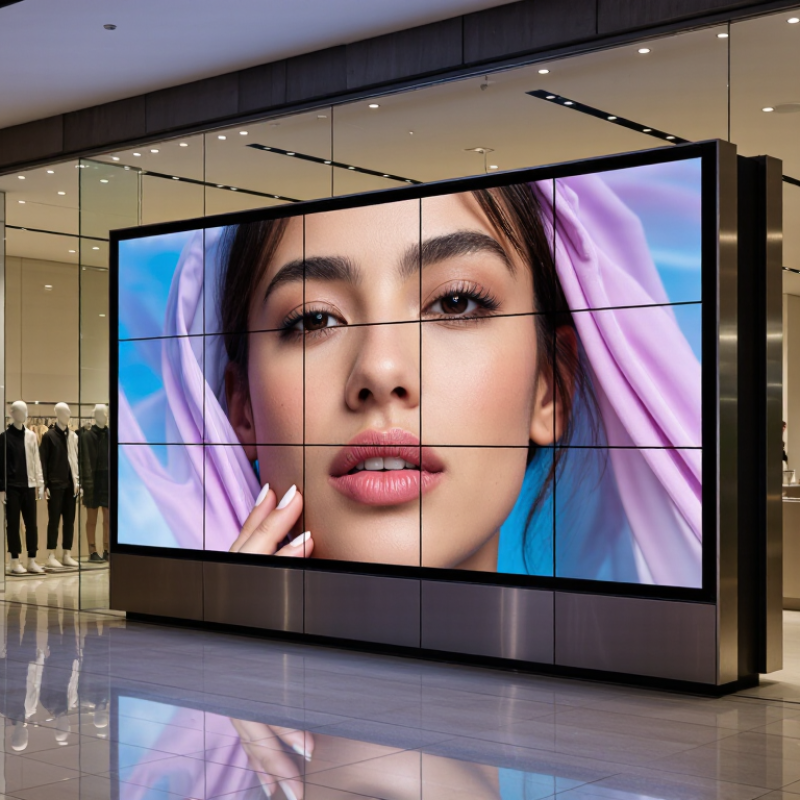
A poster LED display is a slim, upright digital screen built from light-emitting diodes. Unlike a printed poster, it can show motion, rotating promotions, or scheduled announcements. Most units combine an LED panel, control system, protective cabinet, and floor stand or wall mount. Some are made to link several screens; others operate alone. The format is compact.

You’ll often find these displays near shop entrances, hotel reception desks, showrooms, food counters, and exhibition aisles. They can show a promotion at eye level or direct visitors toward a service point. In a bright lobby, high brightness helps, but reflections from glass can still reduce readability. Keep key wording large, and test it from the actual viewing distance. That matters.

A suitable location depends on foot traffic, ambient light, floor space, and power access. Fine pixel pitch can make close-up text and images look smoother, while a coarser pitch may suit viewers standing farther away. Indoor models should not be assumed weatherproof. Nor does movement guarantee attention. A looping animation can feel busy, and poorly timed updates may show stale prices or event details. It is easy to overlook that maintenance and content planning are part of the display itself.

How to Choose a Poster LED Display in 2026?

Pixel Pitch and Approximate Minimum Viewing Distance

Poster LED displays are slim, often freestanding digital screens used in retail stores, hotel lobbies, exhibitions, event venues, and transit areas. As a starting point, a common industry rule of thumb is that a 1 mm pixel pitch suits a minimum viewing distance of about 1 m. Actual results depend on content, screen size, brightness, and viewing conditions, so check the display in its intended environment before choosing.

How to Choose the Right Screen Size, Pixel Pitch, and Brightness

How to Choose a Poster LED Display in 2026?

How to Choose the Right Screen Size, Pixel Pitch, and Brightness

Choose screen size by measuring the installation space and noting where viewers will stand. A poster display beside a checkout counter needs different proportions from one placed in a spacious lobby. For a lobby viewed from two meters away, a finer pixel pitch can keep small text and product details clear. Finer pitch may also increase cost, so compare sample content at your actual viewing distance. Check cabinet dimensions and service access. Small details matter.

Tips: Bring a photo or video you plan to display. View it from several distances, not just up close. Test it live.

Brightness should suit the room’s ambient light. A sunlit window area may need more output than a softly lit corridor, while excessive brightness can feel harsh indoors. Ask for the display’s brightness range and dimming performance, then assess it in similar lighting. Also check glare and color consistency. A specification sheet cannot show every real-world issue. Your initial size estimate might be off; revisit it after marking the screen’s footprint and typical viewing positions.

How to Compare Image Quality, Connectivity, and Content Controls

How to Choose a Poster LED Display in 2026?

How to Compare Image Quality, Connectivity, and Content Controls

Start with the real viewing distance, not the showroom demo. For a poster viewed from one metre, check whether small text stays crisp and skin tones look natural. Compare pixel pitch, brightness, contrast, and refresh performance using the same image on each display. Pixels matter. A bright screen can still look harsh under indoor lighting. Ask to see it beside a window and under the venue’s evening lights. OAAA reported that U.S. out-of-home advertising revenue reached $9.1 billion in 2023, with digital formats contributing roughly one-third. That growth makes consistent image quality more than a showroom detail.

Connectivity needs to fit the actual site. Check Ethernet and Wi-Fi options, signal recovery after outages, and whether content can be updated remotely. Test it offline. A screen that freezes on a blank page is a practical failure, even if its specifications look impressive. For content controls, look for scheduled playback, preview before publishing, user permissions, and clear device-health alerts. These features help staff avoid outdated promotions or accidental edits. AVIXA’s 2024 Industry Outlook estimated global professional audiovisual revenue at about $325 billion, reflecting a large and varied deployment market. Still, market growth does not guarantee a simple setup. I would question any system that requires repeated manual fixes; real venues rarely have time for them.

What to Check for Power, Installation, and Maintenance

A poster LED display can be easy to move, but its power needs deserve careful checking. Confirm the rated voltage and maximum power draw in the product specifications. Ask whether that figure reflects peak brightness, not just typical use. Check the outlet first. A shared circuit may already serve lighting, chargers, or other equipment. Have a qualified electrician assess uncertain circuits, and keep cables secured where people walk.

Installation affects both image quality and reliability. Measure the display, base, and doorways before delivery; a few centimeters can matter. Check floor level, mounting stability, and viewing distance from the intended audience. Leave room to breathe. Keep ventilation openings clear, especially if the display sits near a wall or in a warm shop window. Brightness often gets too much attention; glare from nearby windows can be the real problem. Test the screen at its actual location and adjust it there.

Plan maintenance before the first pixel goes dark. Ask how technicians access the power supply and replace a module, and whether repairs require moving the whole unit. Keep a record of settings, service dates, and recurring faults. Small details matter. Dust, loose connectors, and blocked vents can cause avoidable downtime, so inspect them on a regular schedule. One imperfect but useful step: assign someone to own those checks, rather than assuming they will happen.

How to Evaluate Total Cost, Warranty, and Supplier Support in 2026

When comparing poster LED displays in 2026, look beyond the quoted screen price. Add the media player, floor stand, delivery, installation, and any spare modules. A lower purchase price can become expensive if replacement parts take weeks to arrive. Check expected power use too, especially if the display will run all day in a bright shop window. Ask suppliers to state their assumptions in writing. Small details matter.

Warranty terms deserve a close read. Confirm how long coverage lasts and whether it includes labor, shipping, power supplies, and individual LED modules. Ask what happens when a few pixels fail, not only when the whole screen stops working. A fast replacement sounds useful, but only if the response time and process are documented. Get it in writing. Some costs are easy to miss.

Supplier support can shape the real cost of ownership. Before ordering, request setup instructions, troubleshooting steps, and a clear contact route for technical questions. Ask whether replacement modules will match the original display and how quickly common parts can be shipped. A short test call can reveal how clearly the supplier explains technical issues. A spreadsheet still cannot predict every fault, and I would not treat a long warranty as proof of dependable service. Compare practical support commitments, then judge whether they fit your site and operating schedule.

How to Choose a Poster LED Display in 2026? - How to Evaluate Total Cost, Warranty, and Supplier Support in 2026

Use this checklist to compare like-for-like offers. Cost figures should come from written, itemized quotations; warranty terms and service levels are supplier-specific. Any response-time targets below are buyer-set evaluation targets, not universal industry standards.

Evaluation area What to compare Evidence to request Practical evaluation rule
Display configuration Screen dimensions, pixel pitch, resolution, brightness, refresh rate, viewing distance, indoor/outdoor rating, and front- or rear-service design. A dated datasheet and a configuration drawing listing the exact model and included components. Compare offers only after confirming they meet the same size, use environment, and viewing-distance requirements.
Quoted purchase price Display, control system, receiving cards, power supplies, cables, media player, software, packaging, and any required accessories. An itemized quotation stating currency, quantities, validity period, payment terms, and exclusions. Treat missing line items as unpriced—not as included. Confirm whether taxes are included or excluded.
Delivered and installed cost Freight, insurance, customs duties, local taxes, installation, mounting, electrical work, commissioning, and operator training. A delivery term, shipping estimate, installation scope, site requirements, and a list of customer responsibilities. Calculate the cost through commissioning at the destination; do not compare equipment-only prices with installed prices.
Energy cost Rated maximum power, stated average operating power (if available), operating hours, brightness setting, and local electricity tariff. Power figures for the quoted configuration and the assumptions used to calculate average consumption. Estimate annual energy cost as average kW × operating hours per day × operating days per year × tariff per kWh. Keep maximum and average power distinct.
Maintenance and spares Recommended spare modules and power supplies, replacement part prices, availability period, diagnostic tools, and labor or travel charges. A spare-parts list, written pricing, parts lead times, and details of what maintenance is customer-performed versus chargeable. Include planned spares and likely service costs in the ownership estimate; verify that replacement parts match the supplied configuration.
Total cost of ownership All purchase, delivery, installation, energy, maintenance, and support costs over the same ownership period. A cost worksheet with assumptions, time period, quantities, and exclusions visible. Formula: equipment + delivery/taxes + installation + energy + spares/maintenance + paid support. Compare the same period and operating schedule.
Warranty duration and coverage Start date, term, covered components, repair or replacement process, labor, shipping, onsite service, and whether coverage is transferable. The complete written warranty applicable to the exact quoted configuration—not only a summary in a quotation. Compare covered remedies and total out-of-pocket costs, not just the number of warranty months or years.
Warranty exclusions and claims Pixel-defect thresholds, wear items, accidental damage, improper installation, environmental limits, unauthorized repair, and claim deadlines. Written defect criteria, claim steps, required diagnostic evidence, response process, and responsibility for return freight. Check whether a fault affecting a small area is covered and who pays for diagnosis, shipping, labor, and replacement parts.
Technical support access Support hours, time zones, languages, contact methods, escalation path, remote troubleshooting, and fees after warranty expiration. Support policy, contact details, escalation contacts, and any service-plan terms. Set a written target appropriate to the display’s importance—for example, acknowledgement within one business day—and confirm how it is measured.
Repair and replacement logistics Remote diagnosis, local technician availability, return authorization, repair location, replacement-part dispatch, and estimated turnaround. A sample service workflow, parts stock location, shipping responsibility, and repair or replacement time estimates. Ask how the display will remain usable during a repair and whether a spare module can be supplied in advance.
Supplier continuity and documentation Product identification, configuration records, manuals, wiring diagrams, software access, firmware updates, and continued parts availability. A documentation pack and written policy for software, firmware, and spare-parts support. Confirm that you can identify, operate, and service the purchased unit without relying on undocumented verbal assurances.
Final comparison Technical fit, complete ownership cost, warranty coverage, support access, and repair logistics. A completed comparison using the same requirements and ownership period for every offer. Select the offer that meets the use case with clearly documented costs and service obligations—not automatically the lowest initial price.

Note: Request current written quotations and contract terms for the specific installation. Prices, taxes, warranty coverage, support availability, and service response times vary by project, location, and supplier.

SERVO-ROBOT Inc
Privacy Overview

This website uses cookies so that we can provide you with the best user experience possible. Cookie information is stored in your browser and performs functions such as recognising you when you return to our website and helping our team to understand which sections of the website you find most interesting and useful.